2Do Legacy Edition

2Do Legacy Edition

By Beehive Innovations Services

Score: 4.69315
4.69315
From 3,725 Ratings

Description

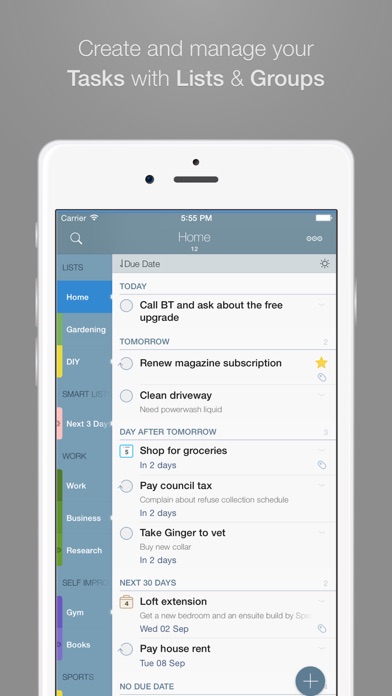
IMPORTANT - 2Do v4 is here. You are looking at the old, legacy version of 2Do. Please visit: https://apps.apple.com/app/2do-todos-tasks-notes/id1470214600 "2Do adapts to my needs, not the other way around. 2Do gets me."- Macstories 2Do lets you take a completely different approach to managing your tasks. With its extremely simple-to-use interface and a comprehensive and flexible set of powerful features, it lets you focus on what's most important to you: your life. There is no wrong way of using 2Do, and unlike other to-do apps, it won't force you in adhering to a particular task management methodology. AWARDS • Macstories: App of the Year 2015 • Apple - App of the week, June 2015 • Apple - Mac App Store “Best of 2013” • “Best App Ever Awards” Winner • Cult Of Mac - 5/5 • Gizmodo "Best app for forgetful people" - Gold Medal PLUGINS: Email to 2Do: Optional plugin that allows you to integrate your email address directly with 2Do, thus allowing you to email yourself tasks from anywhere. You can even use automation, such as IFTTT, to add reminders to your list. SYNC • Stay in sync using one of the following: Dropbox, Reminders (CalDAV), Toodledo, Fruux (CalDAV), Calendar Server (CalDAV), ownCloud (CalDAV), SabreDAV (CalDAV) or a 3rd party CalDAV Server of choice. • Using Reminders CalDAV sync enables Siri • Periodic automatic backups are created for you (compatible with 2Do for Mac) for a rainy day. • Automatic Push sync between devices SIMPLE TASKS, CHECKLISTS & PROJECTS • Create simple tasks, or checklists and projects with sub-tasks. Tasks can have notes, attachments and multiple alarms. • Set any task to repeat using a flexible set of options. • Assign multiple alerts / reminders PASSWORD PROTECTION • Set a lock to the whole app or individual lists LIST GROUPS, LISTS, INBOX & SMART LISTS • In addition to built-in Focus lists that allow you to conveniently view upcoming, starred or scheduled tasks, you can create multiple lists to manage and organize your tasks. • Built-in support for GTD Inbox • Smart lists let you harness the true potential of 2Do using a number of search options, filters and search pre-sets. Using Smart Lists, you can create custom views of your tasks and use them to focus-in or find frequently managed tasks. 
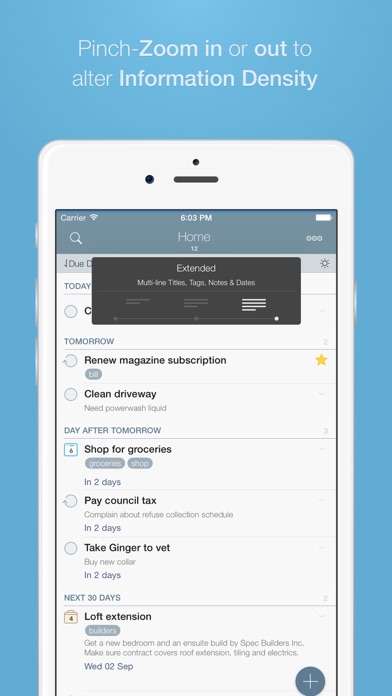
 PINCH ZOOMING • Control the amount of information you wish to see with a simple pinch-to-zoom gesture, from single line titles to multiple lines of titles, notes and tags.
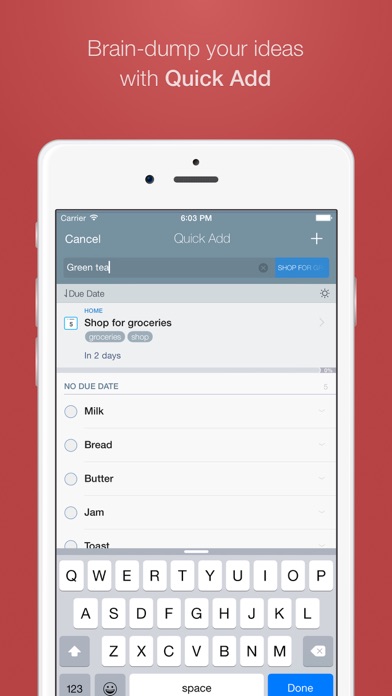
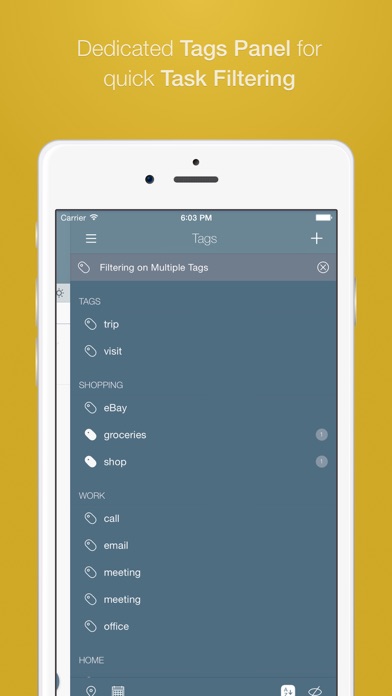
 BATCH EDITING & SHARING • Drag & Drop support to move tasks between lists or drop on calendar to defer • Batch tagging, starring, marking tasks done and more • Task Sharing via AirDrop, iMessage and Email REIMAGINED TASK EDITOR & QUICK ADD • With focus on switching between editors effortlessly using a single tap only, you’ll save dozens of taps and swipes when editing your tasks. • Save your thoughts as they come to you, by using Quick Add (Tap-hold on [+]) • X-callback-url support TAGS • Manage tags from a dedicated Tags Panel • Organize your tags within groups • Leverage the powerful integration of Tags & Smart Lists to filter on frequently managed tasks. 
• Find Used vs. Unused tags YOUR TASKS UNLIMITED • Set a Start Date to hide tasks from a list before they're relevant and add Duration to put an estimate on the amount of time you’ll be spending on your task • Add an action to call, write an email or trigger a URL Scheme right from 2Do • Attach an image or a voice note to your tasks • Customizations for time management • Use as an events / party planner, or an effective birthday reminder • Desktop-class Task Manager ALERTS • Attach multiple alerts to each task • Attach locations to tasks and get nearby alerts as you approach assigned locations DESKTOP-CLASS IPAD APP • Everything from Tasks to Calendar Events - all managed from the same screen. • Manage calendar events and schedules • Split-screen support • Keyboard shortcuts
Screenshots

Reviews

  • New app upgrade

    2
    By jte ktditf.i
    I’ve been using 2Do for 15 years with much success and really liked it until the most recent update. Just tried to sync my data from Toodledo in the new app and it wouldn’t do it. Not easy to troubleshoot
  • Ultra dependable workhorse

    5
    By Helloshark
    I’ve used 2do for many years ago and it’s always worked great keeping complex and simple tasks accounted for. Yes, I’ve tried all the new task management apps that keep coming out, but nothing will beat 2Do. I need to just get things done not keep relearning how the app works when they keep changing all these new apps. Best GTD app.
  • The best…for 20 years

    5
    By Jorge92745
    I have used this app every day for 20 years. It is amazing. It has all the capability you need; but is simple and intuitive. As the years go on, my only wish is that it continue to grow in communication with other apps (native and otherwise, perhaps even integration with AI tools). Also, if a “tip jar” was ever added, I would gladly show my appreciation!
  • Lifelong user. Highly recommend.

    5
    By Coke.641
    I’ve been using this app for yeeeeaaaars. I rely on this app to get me through life, it seems. Lol. I love all the options. You can make it as simple or complex as you want: reminders, lists, birthdays, checklists… I plan on using this app forever. Highly recommend.
  • Used It for Years

    4
    By The Peab
    6/2/26 - Tighter calendar and reminders integration is becoming more critical for me, and I really really like using 2Do, and, I really hope we can get this done. Also, the macOS version really needs the same calendar panel view that iPadOS has, the one where you can see Reminders. Thank you. 3/28/26 - Please add Calendar integration, , and, basic text formatting in the Notes field. I've been a loyal user for over ten years. Thank you. 12/23/25 - After a one year hiatus to Tick Tick, I'm coming back to 2Do. As I get all of my scheduling details transferred, I'm reminded that there are one or two things I really wish 2Do would add - The first and most important is Calendar Subscriptions. The second one I'll add later, once I find this review actually gets added. I have posted several reviews over the years, the latest one was this last weekend, and it's nowhere to be found, neither are any of my other reviews. S'up ?!
  • Truly A Hidden Gem!

    5
    By SuperFlyEDSguy
    It’s no exaggeration when I say that I’ve tried nearly every task management app that’s compatible with both the iPad and iPhone. Some were outstanding and that includes Apple’s very own “Reminders” app, however the user interface was not for me. Some included many of the features that I wanted such as locations, but the pricing was far more than what most people would consider fair. There were apps like “Things 3” that came so close, but was ultimately just too simple as it didn’t work the way my thought processes worked. “Tasks: Todo Lists & Kanban” was practically perfect, well, until I saw the price. “OmniFocus” also seemed to nail it, but again, the cost was far north of what I would have liked to pay. The list goes on… and on… and then on some more. I practically tried every “to do” app with a free trial period, not to mention that I just purchased any apps in the $10 to $15 range that didn’t include trials. I’m sure you get the idea, but the bottomline was disappointment due to one issue or another. I was actually at the point where I finally thought that I had tried everything, so I settled on “Things 3” as that would have worked the best for me with a lot of tweaking. That night, I was up late searching the web for various workarounds to setup Things as close to what I wanted as possible. I really needed documents or photos (a dedicated iCloud folder was the most viable option), and I definitely needed a way to sort priorities and associate people with individual tasks (tags took care of much of that). During that search, I came across a post that mentioned how the OP absolutely loved “2Do,” but no longer found it usable due to the incompatibility with Apple’s Reminders. Basically, this is because “2Do” primarily uses CalDAV for its sync mechanism, however Apple dropped CalDAV support for Reminders with the release of iOS 13 (and macOS 10.15). The thing is, that’s not really a problem, it’s a solid feature and good programming! That was the first time that I came across “2Do,” and I actually really like how they opt for CalDAV as that’s a mature, robust, and feature rich way to go! It’s also extremely stable! So, I didn’t hesitate to give 2Do a try and was absolutely thrilled that I did! Ultimately, I went with Dropbox for my sync solution. There are numerous advantages, but the bottomline here is that the sync options are flexible, meaning that you have more options to access your data. I started using 2Do the next day, but that was more to get a feel for it before moving any live data over. I would say that it works very closely to how my own thought processes work, and therefore it was highly intuitive. Anything that wasn’t immediately obvious was very easy to figure out. The developer also has many resources to help you get started and to answer questions. The intuitive nature of 2Do is good because it’s chock full of useful features! The thing is that it’s not overloaded with features, everything seems to be extremely well balanced for common sense use. Frankly, this is by far the best mobile task management app that I’ve ever used, and very likely the best overall! There are far too many features for me to point out here, but their website goes into further detail. Additionally, as of the last week of April 2026, I see that 2Do was last updated just one week ago! Based on the copyright date, 2Do has been in development for 17 years! That’s an extremely mature product, so I’m confident in using it. I would ultimately say that 2Do brings in the best features of “OmniFocus” (at a fraction of the price) with the simplicity of “Things” (both having a perpetual license), however it could certainly be described as “desktop class.” This product is some serious software! So far, I’ve only been using 2Do with live data for a couple of days, but it’s already proven itself extremely useful. I would also have to recommend 2Do for anyone with ADHD as it will be a tremendous asset. I don’t know why I haven’t come across this product sooner, but it’s truly a hidden gem, and as they say: “Better late than never.”
  • Best GTD app around

    5
    By Happydutch
    I am a GTD adept since its inception, and have used/tried many apps. This app is definitely the closest to the methodology. Not missing anything! It’s well maintained, and the UI (once you get used to it) is a pleasure to use. I’m using it with toodledo.com so that on my PC I can still manage tasks.
  • The Best to do app

    5
    By ClevurGuy
    Have been using 2do for years. It has so many features and things under the hood, but is super flexible and easy to use. Not only can you take tasks, make lists, create projects… I keep ongoing lists like questions for my next doctor appointment, a going grocery list, and things I need to remember. I love it. I have tried many to do apps in the past, but there is a magic in how 2do works and syncs. I use it many times a day. It is one of my top 5 favorite apps, no question.
  • The Best Todo list

    5
    By BigOlBug
    Feature rich and easy to use. The best todo app I have ever used.
  • Request for Arabic Language Support

    5
    By alaslami
    Why doesn’t the app support the Arabic language yet?

keyboard_arrow_up