2Do: To Do List & Task Manager

2Do: To Do List & Task Manager

By Beehive Innovations Services

Score: 4.8
4.8
From 25 Ratings

Description

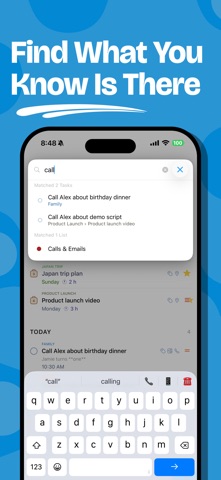
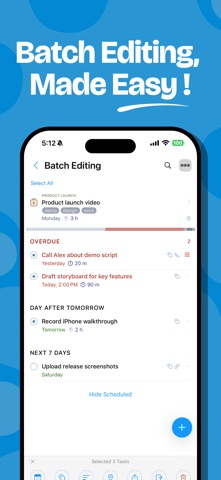
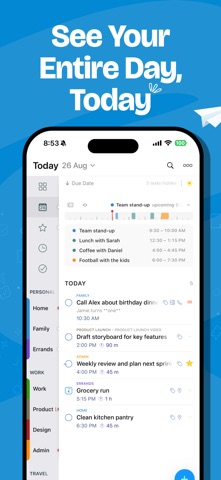
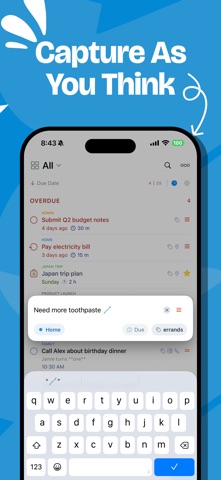
"2Do adapts to my needs, not the other way around. 2Do gets me." — MacStories 2Do is a to do list, task manager and daily planner in one, with a simple, fluid interface wrapped around a deep and flexible set of features. Keep a quick checklist, run a full GTD® system, or anything in between: there is no wrong way to use 2Do, and it never forces a methodology on you. One-time purchase. No subscription, no account to create, no strings attached. TYPE IT THE WAY YOU'D SAY IT • New: natural language input. Type "Call the dentist tomorrow at 3pm #health" and 2Do fills in the due date, time and tag as you type • It reads dates, times, repeats, alerts, durations, priorities, tags, lists and saved locations, in English, German, Spanish, French, Italian, Dutch, Japanese, Korean, Chinese and Russian CAPTURE ANYTHING, FAST • Quick Add: touch and hold [+] and file task after task, with dates, tags and lists as you type • Siri & Shortcuts: add tasks by voice, or wire 2Do into routines that do the whole job • Widgets, Lock Screen and Control Center, so capture never waits for the app • Mail to 2Do: your device gets a private email address, and anything you send it lands as a task, checklist and all • A GTD® Inbox for everything not yet sorted SIMPLE TASKS, OR AS MUCH MORE AS YOU NEED • Start with a task, grow it into a checklist or a project with sub-tasks • Notes in Markdown, styled as you type, with links collected for you • Flexible repeats, start dates that hide tasks until they matter, durations, and actions that make the next call or message one tap away • Attach images and voice notes SMART LISTS: SAVED SEARCHES WITH SUPERPOWERS • Search across titles, notes, tags and dates; sounds-like matching finds it even when you can't spell it • Save any search as a one-tap view: your weekly review, stalled projects, errands nearby • Focus filter: set a rule per list and one tap hides everything that can wait TAGS THAT SORT EVERYTHING • One tap on a tag filters your day to that context; Tag Groups keep big collections tidy • Pause a tag and every task carrying it steps out of view, hidden, not deleted, until you're ready NEVER MISS A THING • Stack multiple alerts on a task and let 2Do nag until it's done • On iOS 26.1 and later, an alert can ring like a Clock alarm: full screen, through Silent mode, until you answer • Nearby: location reminders that fire when you're close enough to actually do the task • See your calendar events right above your tasks, so plans never collide SYNC YOUR WAY Most apps decide where your data lives. 2Do thinks that's your call: • iCloud: uses the account already on your device; syncs tasks, Smart Lists, tags, groups and attachments • Apple Reminders: your tasks live in Reminders too, so Siri and everything that reads Reminders can see them • Todoist: connect your account and run your Todoist projects right inside 2Do • Dropbox, Toodledo, Fastmail, or any CalDAV server you trust, including one you run yourself • When two devices meet, 2Do can merge them instead of making you pick a winner • 2Do for Mac is available separately, so your lists follow you to the desktop MADE FOR ONE HAND • Slide between your lists, tasks and a utility panel with Tags, Nearby and Calendar Events; one thumb runs all three • Pinch to zoom between three levels of detail • Quick Open: type a few letters, land on any task or list • Batch edit and drag & drop: defer, tag or move a whole stack of tasks in one go YOURS, PRIVATELY • Lock individual lists or the whole app • Automatic backups, with single-list restore for the day something goes wrong • Share lists over Wi-Fi with other 2Do users nearby, no cloud in between • Independent light and dark themes • Apple Watch app with complications 2Do has been refined over years of careful work, with feedback from students, parents, professionals and lifelong list-keepers along the way. Use it as a simple list, or push it into full GTD® territory. Either way, it's ready.
Screenshots

Reviews

  • The BEST list app available!

    5
    By Born organized
    I’ve been using 2Do for a very long time. Maybe as far back as the original version. With this newest version, I decided to take the time to fully optimize the way I use it and it’s been fabulous! When I couldn’t figure something out I went to Google and got the answers. It was worth the time I because this app will be all I need to stay on task, get a quick view of my calendar, and keep track of information I don’t want to lose sight of. Bravo!
  • Better and better!

    5
    By Tribbs6488
    Natural language!Awesome and thanks for the update! Being able to synchronize with reminders again is what I have been waiting for.
  • I’ve been using 2Do for 12+ years and it’s the best app of its kind

    5
    By RodrigoRuiz
    I have nothing but praise for 2Do and its developer. Through 12+ years of usage this is the one app I really don’t know what I would do without. It’s the best of its kind. Period. Unless you’re looking for a task manager for teams, then look no further than this. I have tried them all, but none come even close to this app. I can’t recommend it highly enough.
  • I’ve used this for many years

    5
    By miTnosnhoJ
    I am happy to support the new version. It is brilliant that you are still supporting this so many years later. It has great support for GTD but you can ignore the annoying bits of GTD. This keeps me organized and keeps tasks from slipping through the cracks.
  • WOW!

    4
    By The Peab
    That's probably a good place to start. The integrations with Apple Notes and Reminders is finally on its way. I have not tried all of the to-do apps available on the app store, but I have tried most of the big ones - ToDoist, TickTick, MS ToDo, Things3, several newer ones, and of course, Reminders. Things3 has made some recent improvements that kick it up a notch, and I continue to really like that platform for getting things done - simple and elegant. 2Do is a unique workflow and takes a little getting use to, but, I've been using it for the better part of nine-plus years and there's something that keeps me coming back. My biggest complaint is that it's so difficult to find on the app store, that's probably on Apple's traditionally terrible search engines. It is a very elegant app and wonderful to use if you make a personal connection with it. I would also argue it's one of the more beautiful developments in this category as well. A huge leap forward for 2Do is the ability to use iCloud natively. This was possible before the release of v.4, but the tradeoffs were not great ... not an issue anymore, you get it all on iCloud. A couple of final observations: Syncing has become more idiosyncratic - updates don't happen as predictably and instantaneously as they use to. On macOS, if the app is hidden, it will often not update until I bring it to the front, and even then I often hit the sync button at the bottom of the window to get it to actually update. (I have made sure that all of my sync settings are where they should be.) I don't think this will be an ongoing issue as I see there has been several recent updates addressing this issue, including an update that further addressed the issue right after I downloaded it. And finally, the online instructions are a bit ambiguous to me - It's clear enough on how to set up syncing with Reminders, but I'm not clear on what I do after that initial sync. Do I go back to iCloud syncing, or do I have to choose between staying with Reminders sync or iCloud sync? That's it for now, I'll post updates as we go through a major OS update, and as this new version of 2Do gets smoothed out.
  • Great for me

    5
    By magnet6
    I’ve been using this app for over five years and have been super happy. Prior to this I used an app called The Hit List which I loved but stopped being supported. When I switched to 2Do I was impressed how many of the capabilities that I loved were already accounted for. Now, five years later, the developer of 2Do is still pouring amazing energy into their product. I’m super appreciative for the ongoing improvements they’re making.
  • Got my data back.

    4
    By AuntieMaim
    V4 nearly lost my V3 data, but I followed the guide and got it back by restoring a backup.
  • 2Do User Since 2010

    5
    By Lea@67
    Tried many planner apps, but always come back to 2Do. It’s always my go to when I need to combobulate my life! Love all you have done and continue to do to make our lives organized! Thank you!!!
  • Needs custom repeat added

    5
    By Bugsbunny2
    I love this app so I just bought the newest version. This new version is missing the custom repeat option. Ex: repeat every 3 years.
  • Still missing the feature I want most

    3
    By Kirk1234
    No customizable Priorities. Why is that so hard? For years I’ve been trying to find a to-do app that lets me make my own priorities, but no, I have to use “1 bar, 2 bar, star” or whatever dumb system they come up with. What if i want to use “1- Urgent/Important, 2-Not Urgent/ Important, 3- urgent/unimportant, and 4- not urgent or important”? Or something like “1-Do, 2-Delegate, 3-defer, 4-delete”? Theres a dozen ways to prioritize, but 2Do makes you use “low medium high”, whatever that means. Literally all I’m asking for is to make the titles for priorities 1-4 editable. Why is that so hard??

keyboard_arrow_up