LINE

LINE

By LINE Corporation

  • Category: Social Networking
  • Release Date: 2013-06-25
  • Current Version: 26.4.2
  • Adult Rating: 4+
  • File Size: 227.91 MB
  • Developer: LINE Corporation
  • Compatibility: Requires iOS 14.0 or later.

Description

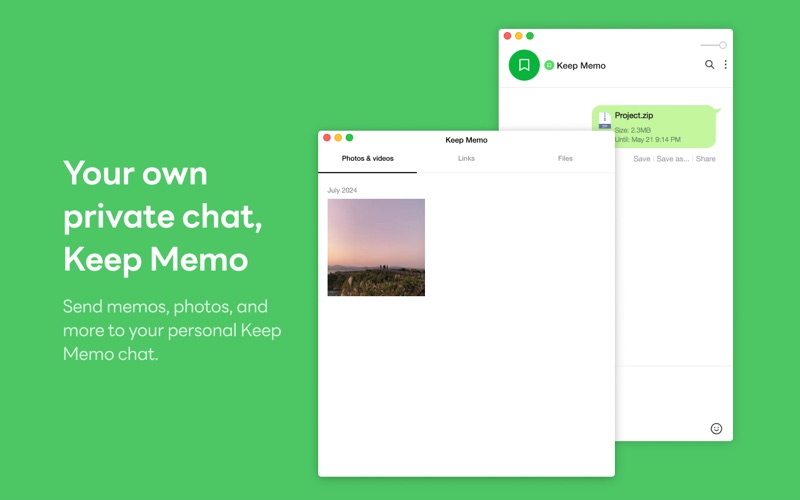
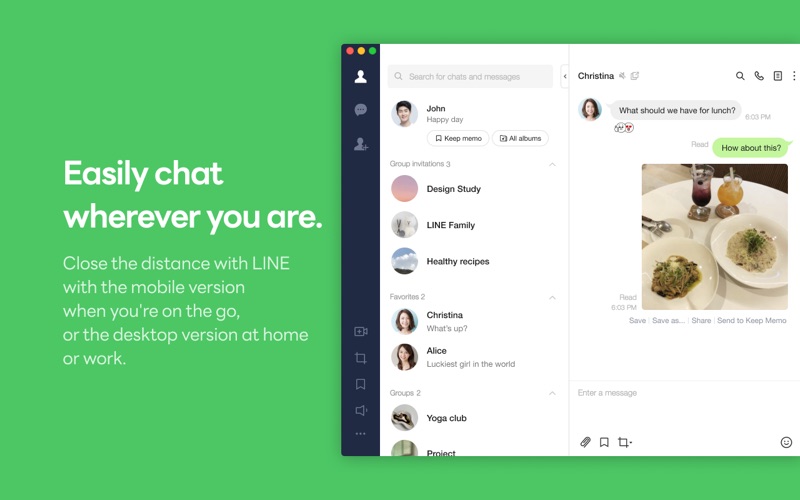
LINE reshapes communication around the globe, letting you enjoy not only messaging but also free voice and video calls wherever you find yourself. Download LINE now and stay close with your favorite people. ◆ Free voice and video calls any time, anywhere. Share your screen during video conferences. Enjoy great quality calls free of charge, no matter where you are. Up to 500 people can join a group call. Host video conferences and online gatherings with the all-new Screen Share feature. ◆ Convenient chats where anything is possible! Send and receive messages, photos, videos, stickers, and even large files from your friends. ◆ Auto-sync your device and PC Your LINE chats are always up-to-date! Whether on the go with the mobile version or connected to the desktop version at work or home, your LINE is synced automatically across all versions. ◆ Your own private chat, Keep Memo Send memos, photos, and more to your personal Keep Memo chat. ◆ Enjoy secure chats with Letter Sealing All your chat messages, calls, and shared locations can be encrypted using Letter Sealing. Your chats are always safe in LINE!
Screenshots

Reviews

  • Sucks

    1
    By mprenfro
    Kakao Talk better. Much better. Your app currently sucks. TOTOMO WARUI!!! Only use because my family is in Japan. Why does it suck. No more USA phone verification. If you are not linked to Google or Apple you can’t log in.. Makes no Fn sense…..!!!! Even Ai thinks you guys suck..
  • TRASH

    1
    By foxwalk
    This is another example of the 2026 black hole death trash incompetence oversaturation of tech in 2026. I cannot create an account I cannot log in to an account ever since they STUPIDLY decided to stop allowing phone number logins. It says “ooh you can only sign up with Apple or Google or email” so I sign up with Apple.. and IT SHOWS ME THE SAME SCREEN DEMANDING THAT I USE MY OLD DEVICE THAT I DO NOT HAVE. So then I think maybe it’s that account and I can sign up with Google or email. ERRR! No, it gives Apple as the only option. So I can’t do anything. Then I try to find contact. ERR!! They use the FAANG method of ZERO TO THE POWER OF 500 MILLION CUSTOMER SUPPORT. Impossible to get support. Their help center is trash. Absolutely useless. THIS APP IS TRASH and it should be and I swear I would trade my SOUL to make this happen: It’s presence on the App Store with this ridiculously HORRIBLE BROKEN UNCARING INCOMPETENT STATE is equivalent to Apple publicly endorsing Adolf Hitler.. THAT IS -> They should immediately REMOVE this TRASH from the App Store until they actually stop being the piece of trash FAANG style “no customer support. Horrible design. Doesn’t work.” Trash that it is.
  • LINE breaks Mission Control Hot corner on Mac

    1
    By Mtstaffa
    Any time I trigger “Mission Control” on my mac’s hot corner, One window (from LINE desktop app) has broken geometry: W H X Y LAYER OWNER 1 1 -10000 11106 0 LINE
  • 登陸不上Mac

    1
    By Susan9527
    明明掃碼並且在手機端輸入6位驗證碼了,但就是登陸不上。Mac一直卡在驗證碼這裡,手機端卻提示你在不同IP登錄是否退出或更改密碼?????我在外旅行不行???我開vpn犯法?????太垃圾了
  • Disappointed

    3
    By Kyle Kai
    Mostly works. But why do I have to go through the login process every time I restart the Mac? If it weren’t for my friends in Japan I wouldn’t use this app.
  • So easy to make it the best…

    4
    By learnenglishwithcharles
    I love Line but two disadvantages. I have to open it from my iPhone, and it’s not transferable to me iPad without losing my iPhone. It could be the best app around.
  • So bad

    1
    By King Kenny's Backyard
    It’s so bad beyond comprehension every time I close the app it requires me to use my phone to scan the QR code to login even though I have the setting changed to login automatically. Incredibly inconvenient.
  • App it’s a “Hack”

    1
    By IsraelMon777
    They force you to sing in with your iCloud, be careful with this app, no gmail or phone number, they want your iCloud credentials. No thank you.
  • Add Spell Check

    2
    By The Constructive Complainer
    Cannot use MacOS spell check/autocorrect in line app for MacOS. Please Fix!
  • The worst messaging ap

    1
    By masayossy
    I would never use LINE if it weren’t the de facto messaging app in Japan. This is by far the worst messaging app I’ve ever used. If anything unusual happens with your account or you do something outside of their standard scenarios, LINE will permanently delete your account without warning. When that happens, you lose everything: your contacts, chat history, purchased stickers... everything. Customer support is nonexistent. You may receive a generic response to your inquiry, but there is no way to reply or continue the conversation. It shows how little the company cares about its users. The only reason LINE is dominating in Japan is because everyone else uses it. If there were a viable alternative, I would stop using it immediately.

keyboard_arrow_up